


Why Directory Opus 10 is the king of file browsers

Meet Directory Opus 10
Today, after 20 years of development, we have Directory Opus 10 - a masterpiece in software.
So why is 'DOpus' so good?
In a nutshell: Directory Opus is a dual column file browser with tabs (and so much more, as you're about to find out).
Microsoft is obviously slow to catch on to the whole "tabs" UI innovation. This was blatantly evident when Firefox took the web by storm back in the mid 2000's, largely in part due to its innovative tabbed web browsing experience. Eventually of course, M$ caught on and introduced their own version of tabs for IE (although it took them a while to adopt the shortcut "CTRL-T").
Okay great, we have tabs for web browsing. But what about file browsing?
Once again, Microsoft is slow to evolve - and lacks a tabbed solution for this purpose. Windows Explorer is a linear 'one folder at a time' kind of file manager.
Directory Opus is the Firefox of file browsing. And not only does DOpus introduce tabbed file browsing, but it features dual-columns. Which is analogous to having dual-monitors; enabling you to compare two active directories at the same time in the same window.
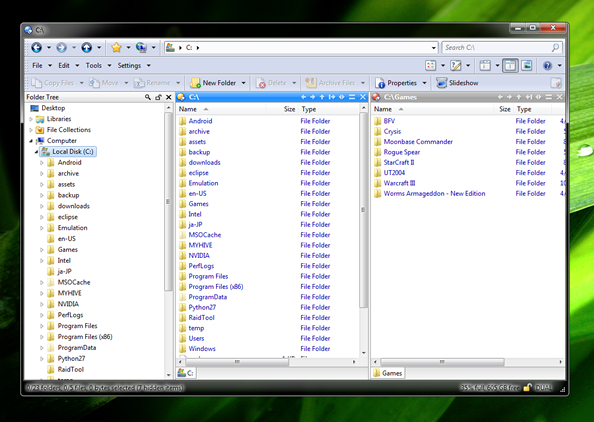
Above: The default layout for Directory Opus 10
A seamless Windows integration, DOpus is a complete replacement for Explorer. That means anytime Explorer would normally open, Directory Opus takes over.
At first glance, it might not look all that different. Other than the dual panes browser, the default layout is designed to look and perform much like Explorer.
But that is where the similarities end.
The Directory Opus 10 Review
I'm an advocate of tools that make you more efficient. Essentially, we use computers for this very purpose. So it makes sense to choose the software that is going to take things a step further and let you do whatever it is you do more easily, more intuitively and faster.
A file browser is the most fundamental 'productivity tool' for professional business nerds. For most of us, it is the most commonly used program on the computer.
If you call yourself a nerd, and you're on Windows, and you're not already using Directory Opus - you'll need to read on.
Because in the remaining section of this review, I'm going to blast through all of the main reasons why DOpus is awesome. And illustrate what professional, rock-solid software is all about.
Access FTP the same way you browse files
What difference does it make if a file is local or remote? Files are files. And DOpus treats them that way. With support for all the advanced features you expect from a powerful FTP program.
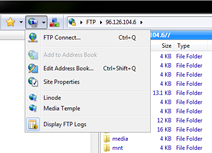
I copied over all my site entries from Filezilla to the DOpus Address Book and haven't looked back. Having remote sites available immediately and directly alongside local directories for basic copy/paste operations is a huge benefit.
ZIP files are directories
Extract files? Pfff, why? Like FTPs, archives (zip, rar, 7z, etc) are treated like regular directories; you can 'go inside' them without having to run the extract. With DOpus, I typically just go into the archive direct, copy/paste the files I need, and that's it. No old school extraction necessary.
Opens fast with the Desktop Double-click-trick
How do you open the most commonly used program on your computer? From the Start menu? A tray icon? A hotkey? Try this: double-click a blank spot on your desktop. If nothing happened, it means you don't have Directory Opus installed. Cause if you did DOpus would have opened immediately.

Personally I use a combination of this trick and a shortcut pinned to the taskbar, right next to the Start button (and with other apps pined to the right).
Dual Panes show you more
You already know it's a dual pane file browser. But if that doesn't fancy you, there are other viewing modes. For example, you can go from "Dual Vertical" to "Dual Horizontal". You can hide the directory tree altogether. And hide toolbars to make things super compact.
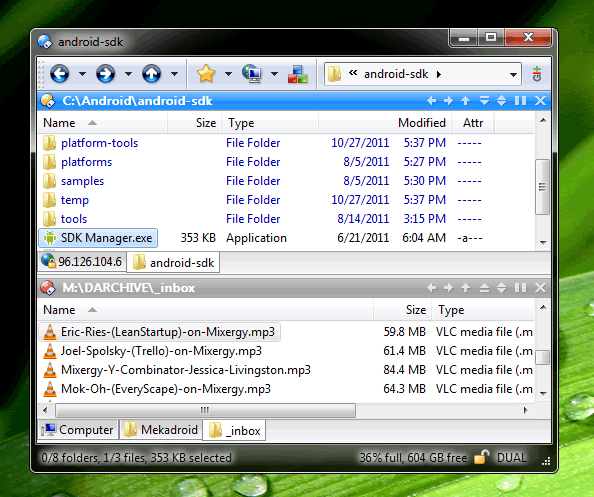
Above: Directory Opus 10 with a customized layout based on the "Dual Horizontal" mode
Browse files with tabs
Its a file browser with tabs. That alone is justification to ditch Explorer. But factor in tabs with the dual panes and you actually have two sets of independent tabs groups open simultaneously (as show in the screenshot above). That's powerful file browsing.
Launch Git console from any directory
You'll notice in my custom Opus layout, to the right of the address bar I have a little button setup for Git. This is a custom button I created to open Git Bash; the Windows Git console.

When I press it, the directory that the Git console starts in is based on the active folder I have open in Directory Opus. Perfect for logging a quick commit; as there is no need to navigate through directories using command prompt.
Store movies with File Collections
File Collections are a special type of folder included in DOpus. Particularly useful for organizing movies or photo collections. A File Collection looks like any other directory, but with the exception that it's virtual. And the actual file locations are irrelevant. So this allows you to create a list of files and folders that can be viewed together, as if they were in one folder - even if their real locations are spread across different hard drives.
Preview almost anything with the Viewer Pane
In addition to images DOpus will preview PDFs, PowerPoint presentations, Text files, and any other type of common format. By default, the Viewer pane is an additional column that opens alongside your dual horizontal panes. Toggable with the click of one button (or hotkey).
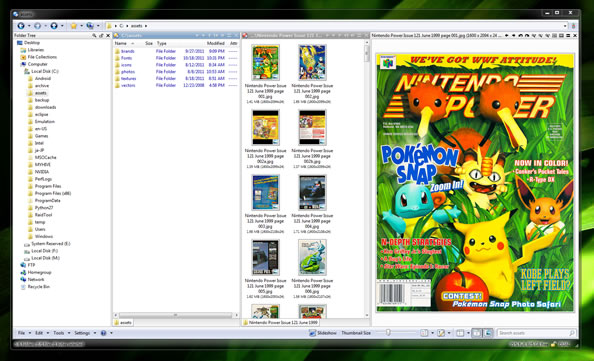
Above: Directory Opus with the Viewer pane open (with an image selected).
Batch rename files with ease
The Rename panel is intense! In this example, I have a series of UX scenarios labeled "scenario1.png" all the way to "scenario10.png". Let's say I want to change the numbering each of the files look like "scenario_001.png" instead.

As with most things in DOpus, you have tremendous control and customization options - but if you just want to do something simple it's self explanatory. Below I add a wildcard by using the * and enter in the new name format. A preview displays of what the new name looks like before I apply the operation.
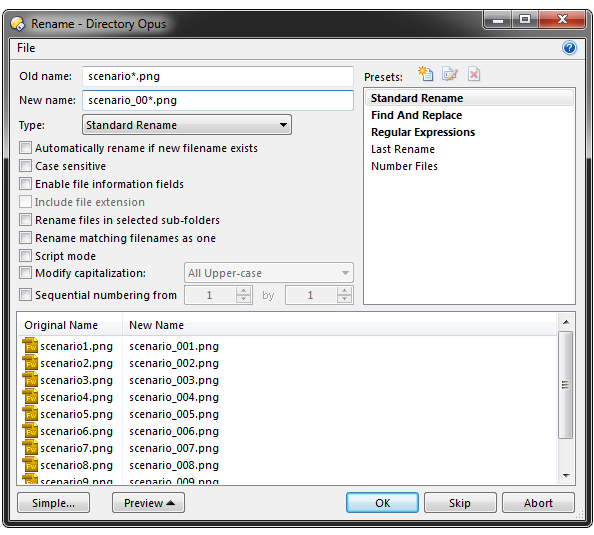
Above: Batch renaming is intuitive and shows you what the files look like before you run it.
No waiting for anything
After 20 years of programming, it has been optimized a little bit. Coded in low level (C++ I believe) and fully multi-threaded - this is a program you don't even know is there. Super lightweight memory footprint and instant open speeds.
Make huge file transfers with confidence
This program will never cease to impress you. Even the most basic concept of copying a file has configurability. But let's assume you're not just copying one file, but thousands. A huge transfer that will take at least a night to perform.
If you did this with Windows Explorer it would be a huge pain in the ass. First, you would have to wait for any file conflicts to pop up (ie "Are you sure want to replace this file?"). Then, if you want to leave the transfer to go all night you have to click "Yes to All". And cross your fingers it goes OK.
Directory Opus file transfers are designed for Unattended operation. In fact, there's a checkbox for 'Unattended Operation'. This opens an options menu that lets you specify what exactly to do when a file exists for an active transfer.
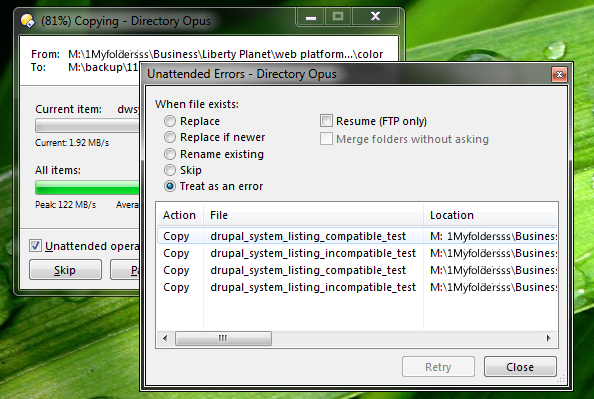
Above: A DOpus file transfer after clicking the 'Unattended operation' button.
Personally, I like the "Treat as Error" option as it will simply skip, proceed, and let you examine conflicted files case by case - the next morning.
Sync two computers with built in Synchronization
I've been waiting for an AeroFS beta invite for sometime now to no avail. Their product seems like it might be a good way to solve the dilemma of keeping my work files synced across both the desktop PC and the laptop.
But then I thought, hey - I wonder if DOpus has anything for that? To my delight, there is a powerful sync tool built right in. And with dual panes, it couldn't be any more intuitive. Set the source in the left column, the destination in the right, and you are good to go.
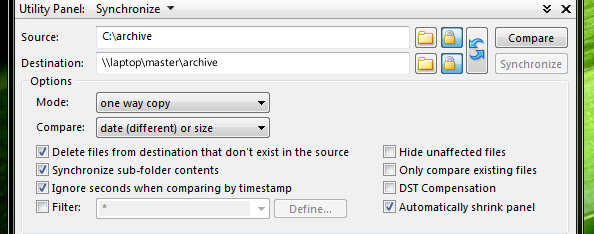
Above: The Directory Opus Synchronize panel, which opens up below your dual panes
Bookmark your favorite file folders
DOpus didn't just borrow the tabs innovation from web browsers, it has it's own implementation of favorites too. In fact, it works nearly identical to how you expect internet favorites to work. With the added benefit of the 'SmartFavorites' system that can be enabled to automatically create favorites based on a custom threshold of activity.
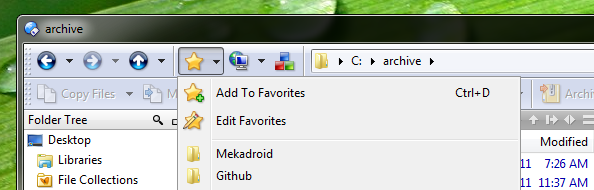
Above: Directory Opus Favorites menu
Set Hotkeys for just about anything
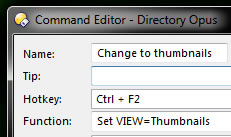
In DOpus you can set hotkeys to a variety of common tasks or file operations. For example, I wanted a quick way to cycle between viewing files in list mode, as thumbnails, and as icons. So I opened up the Command Editor, typed in a name, set my hot key and choose from a list of about 100 built-in functions. Sure enough, there was a function to set the view mode to list, thumbnails or icons.
Customize folders with permanent look & layout
Continuing from the last point. It's nice to be able to switch from viewing files as a list, as thumbnails, or as icons depending on the context. As I showed, this is easily achieved with custom shortcuts. Yet for some folders you're always going to want to see them in one particular way. Even with a shortcut, changing the view to exactly how you want it will become tedious.
Directory Opus has a feature for that! You can set any folder to permanently display in a customized way. That includes things like sort order, filtering, column fields, and even the folder's background color.
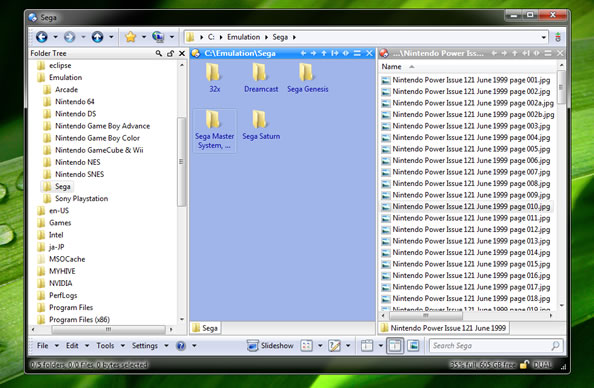
Above: A folder set to thumbnail view and with a custom background color. These customizations are only visible when I am in this specific folder.
Closing Comments
The question is not what does DOpus do, the question is what does it not do. The only thing I can honestly think of is bit torrents. It's hard to fathom why you would ever need to replace something like uTorrent - but then again, up until trying DOpus I didn't consider a need to replace Filezilla either. DOpus is all about integrating all your common file management tasks. And that it does well: in fact, it's perfect.
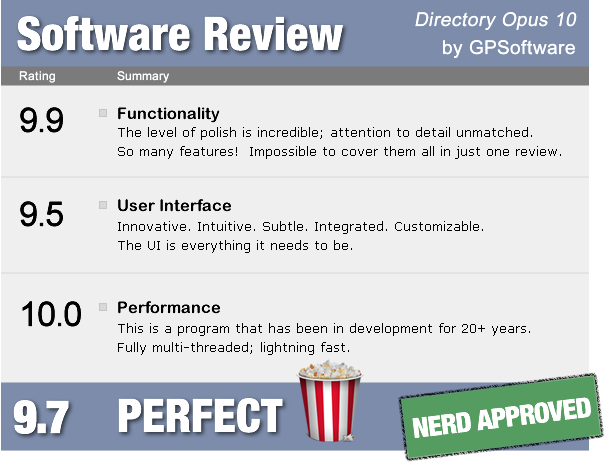

Directory Opus is available from GPSoftware for approx $88 USD. They also offer a 60 day fully functional version you can try out. I highly recommend it. In fact, as your nerd friend, if I could physically wrestle you for control of your computer - I would do it and then install Directory Opus just to make sure you tried this amazing program.


