


How to Organize a Schedule in OneNote
For keeping track of what you plan to accomplish on a day to day basis, nothing beats a good old notebook. Specifically: a Microsoft OneNote notebook :)
There are several good agenda related programs available. Including Outlook, Sunbird, or even Google Calendar. These are especially good at reminding you of important dates for such things as upcoming meetings, events, or deadlines. Where they are lacking however, is in the context of your daily schedule.
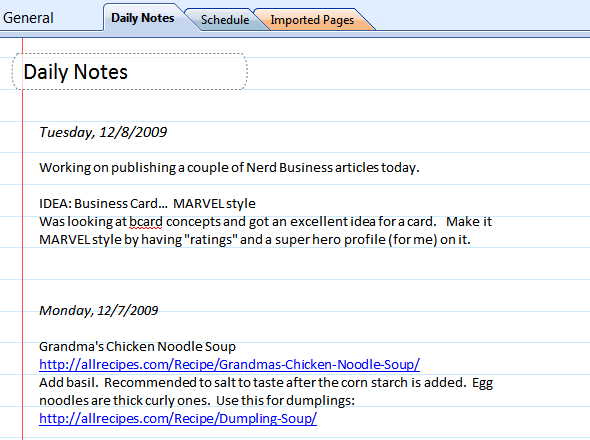
Above: screenshot of my daily notes from OneNote
OneNote is an efficient solution for keeping notes on just about anything. Particularly useful for projects, clients, and daily notes. And the big advantage over the traditional pen & paper notebook is the built in search feature.
If you're like me and you use OneNote to take notes every day, it's logical to use it as a daily scheduler too. To do this, create a new section specifically for your daily schedule. Here's how I set up mine.
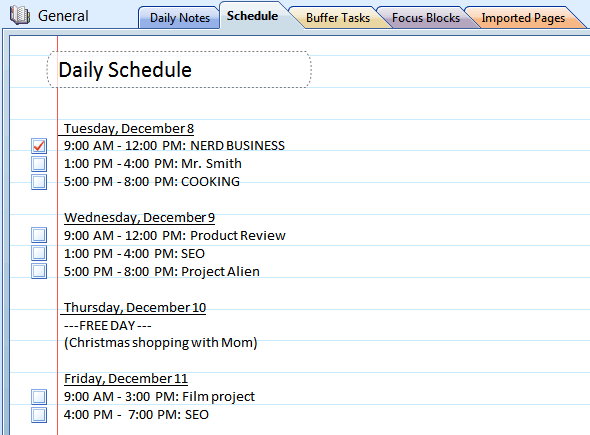
Above: screenshot of my daily notes from OneNote
Based on my Time Management Strategy posted last week - each day is divided into 3, 6, or 9 hour 'Focus Blocks' that are planned in advance. I generally project out about 9 days like this.
Each 'Focus Block' of the day is denoted with a checkbox that I can later check off after completion. It's a nice way to keep on top of things - and to later remind yourself about forward progress.
You won't notice any checklist of tasks on this page. Focus Blocks are intended for focus on just one particular task, project, or client (or anywhere in your life you you want progress). So I organize my "To Dos" in a different way. A separate page, called 'Buffer Tasks' exists for the purpose of keeping track of the little, yet important, things.
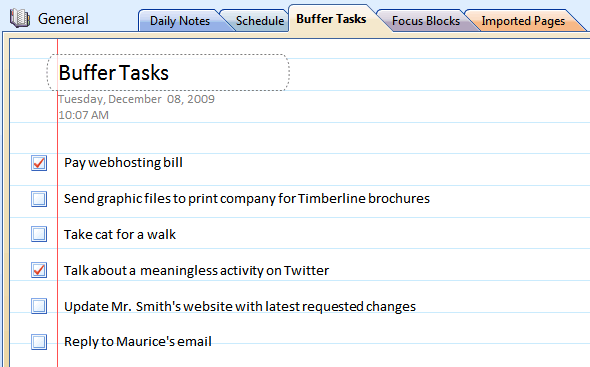
Above: create a separate section for Buffer Tasks outside the realm of your daily schedule
Having your schedule, tasks, and projects planned out in a basic OneNote notebook is better than the old pen & paper method, and certainly better than any other software method I have tried. With OneNote you have quick access to editing (I generally have OneNote open all the time anyway), you can sync this notebook with Office Mobile on your phone, and your daily schedule can co-exist with all of your other important notes; enabling you to become more strategic in your time planning.
Schwabe is an Android app designer and business nerd with a passion for technology, startups, and free market capitalism.


Neat stuff, i never really knew what the hell OneNote was for until i read this.
Have you checked out Evernote ? I think it does what OneNote does and it is free.
You guys should also check out Goalscape. Its not a day planner (OneNote is great for that as Schwabe says in his post) but its a great compliment to OneNote as a tool to help manage your priorities. It runs on adobe AIR
Dunno what it is, but every time I try Evernote its only about 5 minutes later that I am already back to using OneNote. I want to like Evernote but it has yet to impress me. Thanks for the headsup on Goalscape, this is actually a really cool app.
Thank you Schwabe for these useful tips! I'm sure your Grandma's Chicken Noodle Soup was delicious! :))
I like OneNote but it's too expensive... So I prefer free software...
OneNote is helping to plan a day!)
I do not think that is the case with other operating systems. I do agree that Microsoft’s’ Windows OneNote notebook is preferably the one when it comes to keeping or organizing things to be done on a daily basis. But that applies only with Windows because when it comes to Linux and Mac, they have their own to brag about and especially Mac who has iWork which is light years ahead of Microsoft’s office, in my arguable opinion!
oneNote saves my life =) my planning is so bad, thanks
Those who are tempted to use OneNote as an inexpensive alternative to Word or Outlook, don't be fooled: OneNote is intended to be used in conjunction with either -- or preferably both -- Outlook and Word, and you will not reap the full rewards if you try to use OneNote as a stand-alone application.
I'm a pretty die hard Google Calendar user, but you're starting to convince me to switch over to OneNote. (even though I'm also an anti-Microsoft, bleeding-heart-liberal-coastal-elite destroying America - - forgive me)
Good news.This is a great post. I like this topic.This site has lots of advantage. I found many interesting things from this site. It helps me many away..So i want some information for sharing this side with some of my friend. Thanks
<a href="http://freeurdusms.com/">free urdu sms</a>
<a href="http://freeurdusms.com/">urdu sms</a>
I do not think that is the case with other operating systems. I do agree that Microsoft’s’ Windows OneNote notebook is preferably the one when it comes to keeping or organizing things to be done on a daily basis.but i like your software.
http://www.sbpak.com/honda-bikes
Add a comment