


myBase Review: the Superior OneNote Alternative
I have a confession to make. After years of being an avid user and advocate of OneNote, Microsoft's note taking software, I have completely switched to an alternative. A superior alternative. And it's called myBase.
The search for a better note taking program began as a result of a desire for more power. It wasn't that OneNote didn't do its job. Far from. OneNote is designed to work like an everyday life notebook; and it does that exceptionally well. But I wanted something more.
Hell, something tells me there should be more to modern day note taking programs beyond the capability to search and paste images. I mean, I get that Microsoft is trying to emulate the concept of a notebook: but this is 2010. I want something dynamic!
And so, the search for a better note taking program led me to myBase. Here is an in depth review. Along with tips on how to effectively use it.
Why it's better
In a nutshell, myBase is a tree structured free form database. Much like a file browser, data is organized into folders that exist in a tree hierarchy.
Surprisingly, this simple tree structure layout is the biggest advantage of myBase. Because it allows for unlimited depth in the hierarchy.
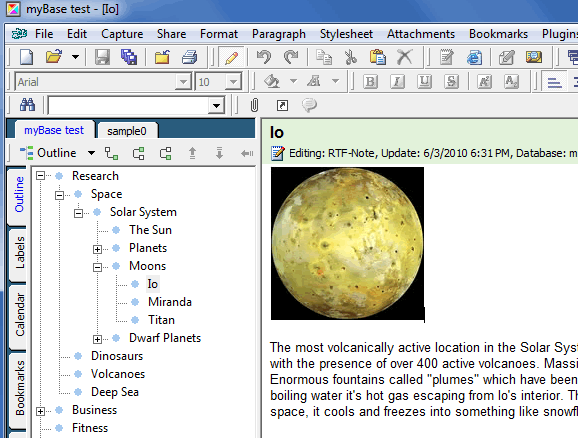
Of course, each directory contains a blank text area for typing out information or adding images, and even attachments. What I really like about myBase is the directory setup. In addition to having unlimited depth, each 'folder' in your tree is treated the same - regardless of whether or not there are child items.
So using the above screenshot as an example - you could have a paragraph introduction for each of your main categories (ex- Space, Dinosaurs, Volcanoes). And then the sub-categories can also have their own child items. And on and on. With no limit on how many child items you can create it becomes really powerful.
For this reason, of a simple yet powerful hierarchy tree, myBase is a far more superior alternative to OneNote for intensive information work.
Capture ideas and build on them
On any given day I have myBase open as much as the email and web browser combined. The great thing about a freestyle note taking program like this is that you can keep notes on just about anything. Day planning. Ideas (as you get them on the fly). Conversation notes.
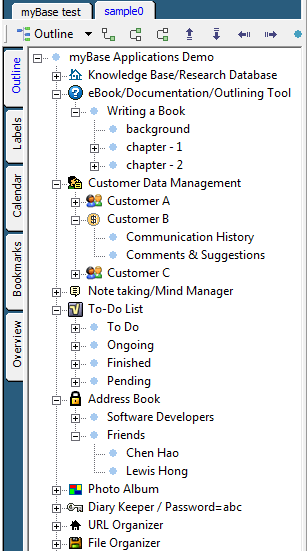
Writing a book? I wouldn't recommend any other tool.
Contact management? Nothing beats a blank page.
But I find the most effective note taking strategy in myBase is for business projects. Any important business, strategy, or project can be micro managed in myBase. Allowing you to have an expansive information dumpsite for any and everything pertaining to your latest projects.
Room for improvement
Of course, the program is not without it's faults. Particularly in handling images. If you paste an image into your notes - the navigation tends to get jumpy - and it increases the file size of your database significantly.
In that regard, lies another inherit disadvantage: the larger a myBase database gets the slower it takes to launch or save. These two quirks are non-factors in OneNote. But aside from save & the initial launch load times myBase is incredibly lightweight.
In addition to the navigation tree, myBase has some other tools to help you organize data.
It has a basic implementation of Bookmarks and Labels; but unfortunately it is just that: basic. There is not much of any really dynamic features to speak of. Which hopefully means they'll be coming soon (tags perhaps?).
Coming Soon: myBase 6.0
myBase is currently in it's 5.xx version with a 6.0 on the way. I asked the WJJ team when the expected release date is and was assured it could be out in as little as a few weeks. For now, the WJJ team is currently offering a free test build of version 6.
You can try that out OR if you prefer a stable release - myBase Desktop 5 includes a 30 day free trial. To buy a license, it starts at $59 which actually includes up to 3 systems (so you can have one on the office, home, and laptop systems). And that's a great value.
Schwabe is an Android app designer and business nerd with a passion for technology, startups, and free market capitalism.


I'm evaluating various note taking apps and whilst MyBase is better than average, it is missing the same feature most of these apps are, tabbed items. Many seem to only offer tabs for trees / databasesbut not individual items / notes, which I find a pretty fatal flaw. So far I've only found AM Notebook and Ultra Recall that offer what I consider essential feature.
The concept is not new, there have been numerous notebooks with tree-view interface. The danger is that as you create more and more deep notes the tree becomes difficult to use. You end up using the search feature anyway. This problem only becomes apparent after months of usage. I think OneNote deliberately chose not to use Tree structure, instead opting for Notebook/section/page/subpage to allow up to a maximum of 4 levels of hierarchy. Another reason for choosing OneNote is that it benefits from Microsoft's product testing & integration with Office, which are more difficult for 3rd party vendors to do. Having looked at myBase features it does seem a well built app. The reason I'm not so optimistic is that I used an app called Tranglos KeyNote in the past and followed its development until it was discontinued -- it was a similar app trying to solve a similar problem. And before that I even tried to write one myself. Just like notepad or to-do applications, everybody wants one that fits their needs but nobody can write one that fits everybody's needs. And the biggest problem is having continuous incentive to improve the app.
For quick notes I usually use Pinteo and for notes that require structure I use Google docs. But thank you for article - will try also MyBase.
Have you taken a look at Wiznotes? This is specifically designed for students however professionals are also finding it useful. It is not just note taking software, it is a productivity tool to help students succeed in their exams. Wiznotes has a lot of interactivity that exploits the power of a computer rather than just replicate physical notebooks in a digital way. Eli Cohen Mesoraware (Wiznotes is a division of Mesoraware)
I have been using myBase for a few years and it has been very reliable. I'm anxious to see if the new version will have a integrated spell checker and better web capture capabilities. I did evaluate another information manager called TreeDBNotes Pro (http://www.mytreedb.com/treedbnotes_pro.html) that has an attractive interface, however it needs a little more work to be ready for prime time.
I created my own note taking application for windows computers if you wanna try it out. It is an all in one note taking program with backups, autosaving etc etc, check out the URL below if you wanna see more info :) www.tommcclean.org/stickies.html
I use OneNote because it also features as a collaborative real-time whiteboard. We use a VPN to manage the files on a server for syncing purposes (info usually updates after 5~10 seconds) or if a team member and I wish to work on a specific section in real-time we can do so using the "Live Sharing Session" feature. I personally use a triple monitor set-up and the feature I am dying for is a two-way screensharing tool so I can see what a team member is looking at and they can see what I am looking at in real-time. This is something that is much needed for people working together abroad.
I’ve been a OneNote fan for years. My only complaints with OneNote are: • Slow launch time • Not easy to export entire pages in bulk • It is not open-source – thus no community support or enhancements I haven’t tried the 2010 version of OneNote but the iPhone integration does look appealing! I’ve not used myBase, but the tree structure does look easy to use. I'll have to look into it.
Hi, I just downloaded MyBase, and I really like it. I've been searching for an alternative to Evernote and so far MyBase seems a good fit.
Does anyone know if MyBase allows searching across multiple databases?
Another user mentioned TreeDBnotes.
I've used TreeDB for years and have found it invaluable as a research tool. I am able to keep a huge database of clippings, screenshots and corresponding notes. It runs well in WINE in Linux. The developer has improved the app dramatically in version 4 and seems committed to ongoing development. I've tried others including UltraRecall, MyInfo and myBase.
I purchased MyBase as well, mainly because I'd heard that it is more stable than TreeDB and because it offers web-clipping. But some features seem to actually be lagging behind TreeDB and Ultra Recall.
Well, I haven't found an organizer that does everything I dream about, but most of the time I use three of them: OneNote (although I use it less now), Evernote (I like the fact that I can take any device and probably there is already EN app for it) and MyInfo (I don't think that I have found another PIM with multiple columns in the tree - a very handy feature).
Everybody knows about OneNote and Evernote. MyInfo seems to be a well kept secret (it is very similar to UltraRecall, but has some differences like the already mentioned columns in the tree). It is available here: http://www.milenix.com/myinfo
@Bassam - I don't know about myBase, but MyInfo does search in multiple databases indeed.
KeyNote though is one of the most powerful free ones. Someone mentioned above that it was discontinued. But it was recontinued by another author only a few years later and is now in active development (as KeyNote NF), looking pretty good. Like other tools though, it has some unique features, and lacks a few features.
In the free category, there are also some interesting cross-platform ones like Zim, KeepNote, and Tomboy.
If you want geekier than that, a powerful one is TreeLine which is a basic customizable database (i.e. with custom labels for your info). And with a similar name but taking more of a spreadsheet approach is TreeSheets, also innovative.
That AM Notebook mentioned above looks kind of interesting too. I might check it out.
On the other end of the scale from the big ones like OneNote there are some very minimalist ones -- Simplenote/ResophNotes, CintaNotes, Stickies, Noteliner, UV Outliner. These are free as well.
Add a comment